Note
Go to the end to download the full example code.
Rasterized ellipsoid
Split an ellipsoid along a 5 x 5 x 5 grid with microgen.raster_phase()
and mesh the resulting phases with gmsh.
Requires the CAD backend: pip install microgen[cad].
import pyvista as pv

from microgen import Ellipsoid, Phase, Rve, mesh, raster_phase
from microgen.cad import make_compound_from_solids

rve = Rve(dim=1)

elem = Ellipsoid(radii=(0.15, 0.31, 0.4))
elli = elem.generate_cad()

raster = raster_phase(phase=Phase.from_cad(elli), rve=rve, grid=[5, 5, 5])

compound = make_compound_from_solids(
    [solid.wrapped for phase in raster for solid in phase.cad.solids()]
)
step_file = "raster_ellipsoid.step"
compound.export_step(step_file)

vtk_file = "raster_ellipsoid.vtk"
mesh(
    mesh_file=step_file,
    list_phases=raster,
    size=0.03,
    order=1,
    output_file=vtk_file,
)
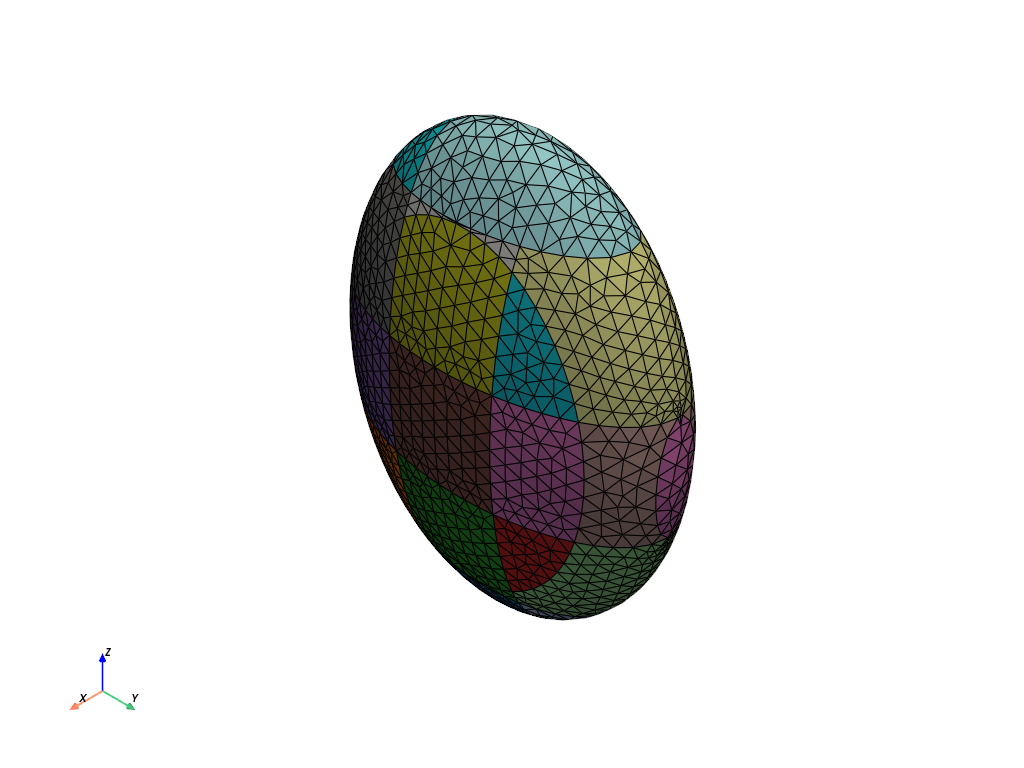
One color per rasterized piece.
grid = pv.read(vtk_file)
pieces = grid.cell_data.keys()[0]
grid.extract_surface(algorithm="dataset_surface").plot(
    scalars=pieces,
    preference="cell",
    cmap="tab20",
    smooth_shading=True,
    split_sharp_edges=True,
    show_scalar_bar=False,
)
The tetrahedral mesh: each piece is a separate physical volume.
grid.plot(show_edges=True, scalars=pieces, cmap="tab20", show_scalar_bar=False)
Total running time of the script: (0 minutes 11.411 seconds)